
High-Level Project Summary
To make an app to manipulate NASA images of Jupiter, and create a repository of images that can be imported into Scratch to enable young people to explore the data in fun and creative ways.The essence of this challenge is to take the images collected of Jupiter's surface and give viewers a way to interact with it. Our team wanted to use a model spacecraft with a Microbit at its heart as the method of steering the view. We also wanted to create display that also simulated looking at the planet.
Link to Final Project
Link to Project "Demo"
Detailed Project Description
Our project has 3 elements
Microbit Spaceplane - make a battery powered microbit inside a cardboard space plane bluetooth linked to the laptop running Scratch that collects the gyroscopic readings as the model is moved.

This is a fun element to help children interact with the content.
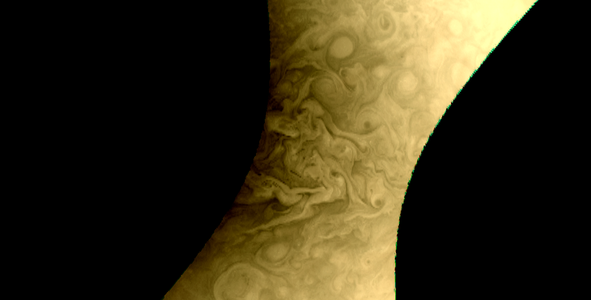
Images - using NASA JunoCam images in a python program to give the ability to combine the 3 layers and enhance elements of them.

The heart of the actual challenge is an app to allow people to control, combine and explore the data NASA has collected. We used Python, Pillow and Gimp to process the images, including changing the order of the RGB images to create new and creative images with vibrant colours and effects. We also wanted to allow children to use the data and making the data avaialble as Scratch backgrounds seemed like an interesting idea.
Our idea was also that people could combine the channels in different orders and use different filters to show that aliens might see the planet in a different way to humans.
Scratch backgrounds
A fun way to look at the images would be for Scratch users to interact with them so we wanted to look at how we could allow them to use these images for their projects. We looked at how big background images could be. We propose that users could put in border sprites to allow logic to move from one screen to another. The biggest issue is dividing up the images and storing them in a way that could be addressed simply.
The Microbit is intended to be a fun playful way to interact with the app. One could replace this with say an XBox Adaptive Control or some other controller. We do have one of these and may try to use one.
Space Agency Data
NASA Junocam data:
https://www.missionjuno.swri.edu/junocam
specifically
id=13557
id=13894
Hackathon Journey
Quote of the day, "I am genuinely surprised that we got that to work!"
As a team of 4 we all came with different ideas. Benji and his dad had the idea of the microbit space plane. Maddy was interested in the coding and creative elements of the challenge. Trevor was keen to try to find a way to use the neopixels to help show the surface of Jupiter, but had misread the challenge.
Coming together as a team we quickly found that we had a good set of complimentary skills.
We were able to identify the 3 core elements of the project - control, images, display and set to work.
The first half a day seemed to be getting our heads around the challenge.
On the Saturday initally we had to overcome some issues with the Microbit which would only work via a USB cable until we were able to clean and fix the battery box. In the end some wires had to be rejigged.
Maddy made a start on the Team report before moving onto Python programming (including RGB split and merge and Pillow ImageFilters) and image manipulation of the JunoCam data.
Trevor did hit a bit of wall with the fadecandy controller as again linking the image to the python program has not been obvious. He then went on to try to work on a store to put the images for Scratch use
In the end we did not create a fully working app, however we have the start of an idea and some interesting launching points. We did get the microbit to work with Scratch.
References
Scratch
Microbit extension for Scratch
The combination of the spaceplane and a Jupiter background created from NASA data.
https://scratch.mit.edu/projects/739898758
Images
https://www.missionjuno.swri.edu/junocam/processing
Python Programming
Tags
#hardware #Scratch #Jupiter