
Imagine you’re an astronaut who has newly arrived on the Red Planet. Your habitat has been pre-constructed for you, but, other than three 3-D printers, it doesn’t have most of the things you need to live and work. Your challenge is to design tools, furniture, and other items to assist you on your one-year mission.
The Challenge
Background
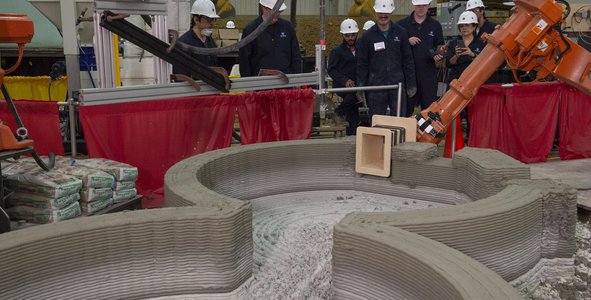
Your habitat on Mars has been pre-constructed using robotic manufacturing techniques and indigenous (local) resources, such as Martian regolith (sand and rocks) and polymer materials made from the CO2 in the Martian atmosphere. Your habitat contains three printers: one that can make strong but small metal objects, one that makes weaker but larger plastic objects, and one that makes very large concrete objects. Although metal is the strongest of these three materials, the metal printer can only make small items and it’s difficult to get metal from melting and chemically processing the regolith on Mars, so supplies are short. A lot more material for the plastic printer is available to you since polymers are made mostly from chemicals in the atmosphere. The plastic printer can make larger items than the metal printer, but they aren’t as strong. The Martian concrete printer can make very large heavy items – it made large pieces of the habitat before you arrived – but it can’t make objects with fine details like the other two printers can.
Here’s a summary of the three printer build volumes (length x width x height) and their resolutions:
- Metal: 150mm x 100mm x 100mm, 0.1mm resolution
- Plastic: 310mm x 130mm x 140mm, 0.1mm resolution
- Concrete: The concrete printer can make giant objects, but it’s outside the habitat. Anything you make to go inside your habitat must fit in the 2m x 2m x 2m airlock and decontamination area. 25mm resolution
Other than the printers, the habitat doesn’t contain much. The habitat makes enough food, water, breathable air, and power to keep you alive for now, but you’ll need to make almost everything else. You also lost most of your tools during a rough landing and will need a variety of tools to fix anything that breaks. In addition, a wheel on your new rover is damaged.
Objectives
Your challenge is to design tools, furniture, and other items you will need on your one-year mission. You can start by making a list of all the things you’d like to have or need to have in your habitat to work and live, then generate designs in the .stl format. Don’t forget to design new tools and a replacement rover wheel. Although you may not be able to design all the items on your list, the more designs you generate, the better!
For each 3D part of your design, remember to provide an accompanying description of what it is, which printer will generate it, the overall measurements, any assembly instructions, and a description of what it will be used for. Note that if you need certain components to make your items work that you cannot print (like batteries or lights) you can get some of those components from your landing craft.
Potential Considerations
As you develop your designs, you may (but are not required to) consider the following:
- For the replacement rover wheel: You can examine images on the internet of the wheels used on the Curiosity and Perseverance rovers—they are built from lots of traditionally manufactured parts put together with tiny bolts and screws. You can also check out the simplified model in the ARC 3D models database (see the Resources tab). Your rover can be a lot lighter than these rovers, but it needs wheels about the same size to get through the sand on Mars, and the wheels need deeper tread than the Curiosity or Perseverance wheels. Consider designing your wheel with a closed outboard face (the side of the wheel that you can see when the wheel is attached to the rover) to keep sand and rocks out. Expert teams may want to make the wheel treads leave a pattern or message in the sand that indicates which way the rover came from.
- For tools: Since you don’t have a lot of supplies, especially for the metal printer, remember that you can design items consisting of multiple pieces that can be assembled later. For example, even on Earth most screwdrivers have strong metal rods, but plastic handles where the materials don’t need to be as strong. Designing parts that fit together can also be useful for making items that are longer than you can print in one piece using your smaller printers.
- Consider designing multi-tasking items: You may be able to save material by making one item that performs lots of different tasks. Are any parts on your list similar enough to be combined? Perhaps your screwdriver handle can also be your fork or spoon handle. Maybe a concrete workbench could also store your space suit gloves with a built-in storage space or by using small metal hooks (printed by the metal printer) inserted in slots in the bench. Maybe you design a toolbox that is also part of a fun game to keep you from getting bored. Use your imagination – sometimes the best way to save material is not to build something at all because another item can get the job done!
- For advanced teams: You could try to make sure your designs are easy to print – e.g., that they don’t have large overhangs. Or if they do need overhangs, consider including a support structure. Don’t forget to indicate the build direction in your documentation.
- You can get inspiration from online 3D printing databases, but if you use other peoples’ work, remember to indicate that in your design notes.
For data and resources related to this challenge, refer to the Resources tab at the top of the page. More resources may be added before the hackathon begins.
NASA does not endorse any non-U.S. Government entity and is not responsible for information contained on non-U.S. Government websites. For non-U.S. Government websites, participants must comply with any data use parameters of that specific website.