Awards & Nominations
Moonshakers has received the following awards and nominations. Way to go!
Global Nominee


Moonshakers has received the following awards and nominations. Way to go!
MoonShakers is an interactive 3D lunar globe on a web app using the Globe.gl web component and used seismic geophysical data transmitted back to Earth by several instruments left behind by NASA’s Apollo astronauts. Specifically, we used a dataset named nakamura_1979_sm_locations.csv. We added data on the points layer and attached the ripple effect at each point to show moonquake propagation. The datasets we used contained a total of 28 moonquake locations with their dates, times and magnitudes. We have represented moonquakes as ripples propagating on lunar surface. We have added a vibration sound effect, and actual vibration of mobile devices, making it entertaining and interactive.
“It all depends on what you visualize”. - Ansel Adams
MoonShakers! What exactly does it do?
Our project uses the globe.gl web component which is based on Web.gl and Three.js to make an interactive 3D globe. It creates an interactive globe on a web browser on a desktop or a mobile device. The globe can be rotated as well as zoomed in for better visualization. We have tried to depict the location and the magnitude of moonquakes through various mediums such as visual, audio, and physical representations.
 Visual Representation
Label: Epicenters of moonquakes are marked by labels as mentioned in the data we have used. If you hover over the label of any moonquake you might see details about it, as in the image above. Details include Moonquake number, magnitude, location in lunar latitude and longitude, and date and time of moonquake. On mobile devices, labels show up on touching the labels.
Ripple Radius: We have added ripples at the epicenters of the moonquakes. The maximum ripple radius is proportional to the magnitude of moonquakes. We have used an angular radius, in radians, six times the magnitude of a moonquake. We found this value by trial and error and settled for six as it provided the best visualization for us.
Ripple Color: Ripple color represents the increasing severity of moonquakes. Ripple color provides another visual representation of moonquake magnitudes. The maximum magnitude of a moonquake in our data is 3.2 as well as the minimum is 0.7. So we divided the data into four scales 0 for magnitude between 0-1, 1 for magnitude between 1-2, 2 for magnitude between 2-3, and 3 for magnitude between 3-4. The colors representing different scales of moonquakes are given below:
Hexcode #0066FF blue for scale 0
Hexcode #007800 green for scale 1
Hexcode #FFC802 yellow for scale 2
Hexcode #FF2A04 red for scale 3
Ripple Concentration
The ripple concentration is inversely proportional to the magnitude of the moonquakes. It signifies a higher frequency for a higher magnitude of moonquakes.
Fading Ripples
As the shaking of a real moonquake would fade over a distance, the ripples of the moonquakes in our web app fade to zero as it reaches the maximum ripple radius defined in the sections above.
Audio Representation
We have used a vibration sound effect to denote the severity of moonquakes. The audio is played when clicking on the label of moonquakes on the globe. The audio is taken from freesoundeffects.com. The audio play duration is proportional to the scale (defined above) of the moonquake. The exact duration of the sound being played is 500ms×(scale+1). We added ‘1’ to the scale as our first scale is ‘0’ and if ‘1’ is not added it implies that the audio will not be played. And, we chose scale over magnitude as magnitudes give unnecessary variability of sound duration which we cannot even perceive properly. And, choosing a scale also provides consistency with the colors used.
Physical Representation
The physical representation of the moonquake is done by the vibration of the device. We have used the Vibration API for vibrating devices for a particular duration to represent a moonquake. The device vibrates when clicking on the label of moonquakes on the globe. Currently, Vibration API is only supported on Android devices so you may not feel the vibration when used on iOS devices. (Since the label layer is below the ring layer, you might have to touch the label multiple times on mobile devices)
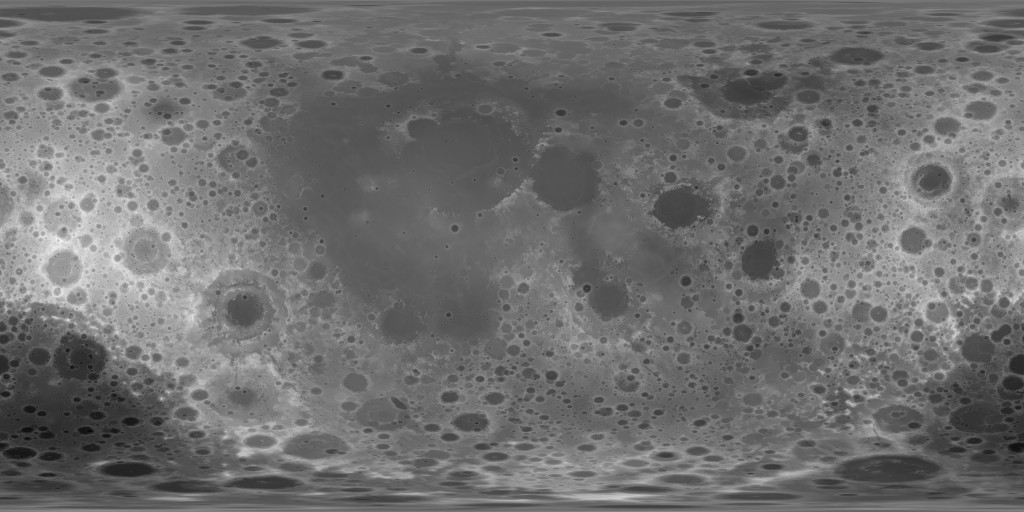
We tried to use NASA (or any NASA’s space agency partners’) data at every possible place. The texture map and displacement map of the moon is taken from NASA’s Scientific Visualization Studio (SVS). We have modified nakamura_1979_sm_locations.csv, download from Planetary Data System (pds.nasa.gov/) and used it as our data source. The data source contains 28 moonquakes data; their epicenter locations in lunar latitude and longitudes, their date and times, and their magnitudes. As we have used magnitude of moonquakes for all sorts of visualization techniques; we have chosen this dataset as it also had magnitudes of moonquakes in it.
This is not the first time we participated in NASA's Space App Challenge. Our previous project has gotten a good response and was selected as a global nominee. As always, the space app challenge had brought amazing challenges for all. We were excited while choosing our challenge, and many other categories were also interesting. We as a team try to take on challenges that we do not have any idea about but at the same time are very exciting to us. This year we took a challenge to develop a web app. So, we looked for the challenges that fit our excitement.
First, we though to make a web app using artificial intelligence. Later, we thought of doing something visually appealing. Hence, we chose to make a moonquake map, the idea was pretty new to us. We knew the basics of python and some libraries. But after choosing this challenge we also learned the basics of HTML, CSS, and JavaScript. While scouring the resources we got to know that Web.gl web component along with Three.js can be used to make a 3d interactive globe. Later we also discovered Globe.gl web component where creating and manipulating a 3d globe is pretty easy. Globe.gl also had pretty well-described documentation, in which, we found an example where moon and moon landing sites were created. We used that code but having no previous knowledge about the functionality of many things in there, it took us hours to add the data we needed to show on the globe.
Globe.gl also had an example of showing a random ripple effect on the globe. We saw an opportunity there and were eager to integrate that into our web app for depicting moonquake propagation. We also wanted to show a lot of features of ripples to depict the magnitude of the moonquake, like the time duration between ripples, which had to be inversely proportional to the magnitude of the moonquake showing an increase in frequency with an increase in magnitude, the colors to represent the magnitude, the maximum radius of ripples to again show magnitude, fading colors to represent fading of moonquakes. It took us quite a long to figure these things out way into the first day of the hackathon, around 16 hours of work, to be exact. After hours of fiddling with the code, we, finally, managed to achieve what we wanted.
After that we also wanted to represent magnitude of moonquakes via audio. We wanted audio to be played for a duration of time proportional to magnitude of the moonquake when clicked on the label. We figured this out quickly. Later we also added by vibration to our web app as a physical representation of magnitude using Vibration API. The vibration duration is also proportional to the magnitude of the moonquake. Vibration API only works on android devices. We had done this pretty quickly too. As soon as we completed this, we uploaded our project on GitHub and made our page accessible, via GitHub pages, so that we can debug this as we use it.
We have also added a click-counter to our web app which lets everyone know how many times the page has been viewed. The click-counter can be seen after scrolling the web app page via scroll bar.
From knowing nothing about a web app to creating fully functioning amazing web app, it had been fascinating journey for us!
References
Moon texture map: https://svs.gsfc.nasa.gov/vis/a000000/a004700/a004720/lroc_color_poles_4k.tif
Moon Displacement map: https://svs.gsfc.nasa.gov/vis/a000000/a004700/a004720/ldem_3_8bit.jpg
NASA SVS: https://svs.gsfc.nasa.gov/
Apollo Passive Seismic Experiment Explained Event Catalog Online: https://pds.nasa.gov/ds-view/pds/viewBundle.jsp?identifier=urn%3Anasa%3Apds%3Aapollo_seismic_event_catalog&version=1.0
The dataset: https://pds-geosciences.wustl.edu/lunar/urn-nasa-pds-apollo_seismic_event_catalog/data/nakamura_1979_sm_locations.csv
Globe.gl: https://globe.gl/
Vibration sound effect: https://freesound.org/people/deleted_user_2104797/sounds/346711/
GitHub: https://github.com/
GitHub Hit-Counter: https://github.com/gjbae1212/hit-counter
Background music for demo: https://youtu.be/FrjpFmyTSCc
#lunarglobe #lunarmap #coding #Seismicwaves #webapp #moonquake #globegl #github